Thursday, March 5, 2026

Daily life Linux problems..

 ## Confessions of a Distracted Linux Coder: How "Port Already in Use" Turned into Heimdall


Hey everyone,


You know those moments when you're deep in code on Linux and suddenly…  

**"Why can't I delete this file?"**  

**"Which damn process is holding port 8080?"**  

**"Wait, who just opened that socket?"**


One minute you're writing a function, the next you're running `lsof`, `ss`, `fuser`, `ps aux | grep`, `journalctl -u`, and `iotop` like a madman.  

By the time you fix the tiny problem, you’ve completely forgotten what you were actually working on.


**"What was I doing again?"** ๐Ÿ˜…


Or worse — that paranoid feeling creeps in:  

"Is everything okay? Why is systemd-journald eating CPU?  

Who is scraping my disk like it's a frying pan?  

Why are the modem lights blinking non-stop?  

Who is sending all these packets?!"


And the worst one:  

"Did that innocent little package I just installed silently start talking to the outside world without telling me?"


Switching between five different TUIs and terminals just to answer basic questions gets exhausting.  

I got tired of it.


So… I ended up going down the rabbit hole.  

What started as a quick hack to find "who's using this port" slowly grew into something bigger.


And because I can't help myself, I added way too many icons to make it feel a little more fun ๐Ÿ˜„


Ladies and gentlemen, meet **Heimdall** – my little terminal watchdog that's still very much in its crawling baby stage.


https://github.com/sunels/heimdall


It's nowhere near perfect, but it already saves me a surprising amount of time every day.  

If you ever feel the same frustration, give it a try.  

Feedback, suggestions, or even a tiny PR would genuinely make me happy.


Thanks for reading,  


Sunday, February 22, 2026

Heimdall – How a Simple Port Error Turned into My Crazy Terminal Side Project


Hey folks,

Everything started because I got so tired of that classic Spring Boot error: “Port already in use”. Every time I had to hunt down the PID in the terminal, kill it manually, and pray it didn’t happen again five minutes later… ugh.

I was fed up scrolling through ss, netstat, lsof, ps — all that noise just to free a port during a busy workday.

Then things got out of hand (in a good way ๐Ÿ˜„).

I started building something small… and it kept growing. Now Heimdall is this beautiful curses-based TUI that watches ports, processes, files, risks — and even runs as a daemon in the background.

The coolest parts right now are Sentinel (it spots shady behavior like backdoors, masquerading processes, deleted binaries, suspicious listeners) and Daemon mode (it quietly monitors suspicious outbound connections, suspends the process, and asks you to allow or kill — either via a popup modal if the TUI is open, or a notification + timeout if not).

Whenever I think “hey, this would be cool to add”, I throw it at an AI agent while I still have tokens left ๐Ÿ˜‚. Sometimes I just feel like the product owner who never stops adding features.

If you want to join the fun, check out the repo: https://github.com/sunels/heimdall

or https://pypi.org/project/heimdall-linux/

Give it a star, try it, break it, send feedback/PRs — I’d love to hear what you think (or what crazy feature I should add next).

Thanks for reading, stay safe out there!

Love, Serkan ❤️


Saturday, January 17, 2026

Linux terminal tool for port process open files

 Interactive terminal-based port, process, file, and resource inspector for Linux


portwitr-interactive is a high-performance, curses-based Terminal User Interface (TUI) designed to give you instant visibility and control over your Linux system — all from a single, interactive view.

Tool for sysadmins and developers

✨ Features

๐Ÿ” Live port listing using ss

⚡ Shows CPU% / MEM% usage per process

๐Ÿง  Maps PORT → PID → PROGRAM

⛔ Firewall toggle for selected port (temporarily block/unblock traffic)

๐Ÿ“‚ Displays all open files of the selected process (/proc/<pid>/fd)

๐Ÿงพ Deep inspection via witr --port

๐Ÿ–ฅ️ Fully interactive terminal UI (curses)

⚡ Real-time refresh

๐Ÿ›‘ Stop a process or systemd service directly from the UI (with confirmation)

๐Ÿ“ Warnings annotation (e.g., suspicious working directory is flagged but explained)


Checkout and Play: https://github.com/sunels/heimdall

Installation: https://github.com/sunels/heimdall?tab=readme-ov-file#-installation

    wget https://github.com/sunels/heimdall/releases/download/v0.1.0/heimdall_0.1.0-1_all.deb
    sudo dpkg -i heimdall_0.1.0-1_all.deb
    Run:
    sudo heimdall
    
    # or just
    heimdall


Saturday, January 25, 2025

Ollama - open-webui - deepseek - CPU - local run

Conversations on it :

Let's build a mini-ChatGPT that's powered by DeepSeek-R1 (100% local):

Why do we need to run it locally when we can always run it from deepseek site?

Privacy mainly, You can run it from the site if you want but this is for companies or tech departments that want to run it locally and not worry about what data / info could be leaked

Okay, but why build your own front end when open webUI exists? I can build an identical local solution with 2 commands (ollama pull, docker run).

A company may want to incorporate it into their own site for specific purpose to incorporate their branding and feel

Various reasons, but yes if I was just messing with it I would just do what you mentioned


sunels@sunels:~$ docker run -d -p 3000:8080 -v ollama:/root/.ollama -v open-webui:/app/backend/data --name open-webui --restart always ghcr.io/open-webui/open-webui:ollama
Unable to find image 'ghcr.io/open-webui/open-webui:ollama' locally


http://localhost:11434/

http://localhost:3000/

Settings


run distilled model
ollama run yasserrmd/DeepSeek-R1-Distill-Qwen-1.5B


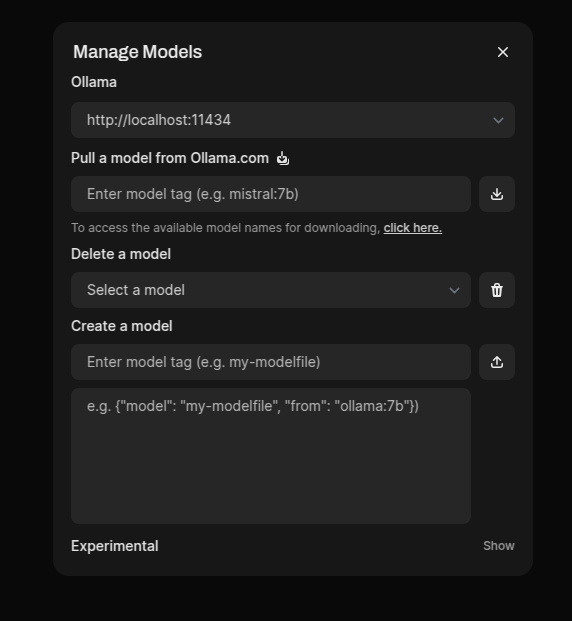
Download and use Distilled DeepSeek Model within open-webui


Dont forget to fetch metadata from ollama before search/download

Distilled model thinking duration 3 min (original model took 11 mins)